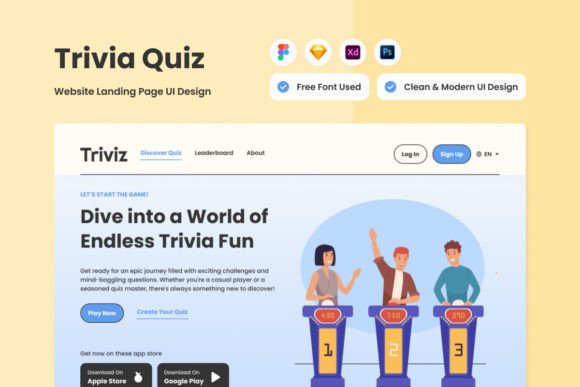
Triviz - Trivia Quiz Landing Page V2: A Designer's Deep Dive
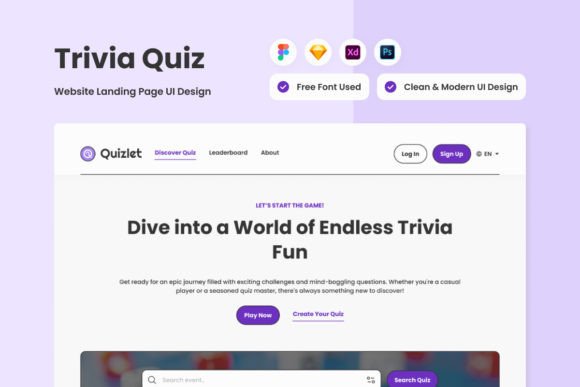
Let's be honest, most quiz templates feel like an afterthought—a generic form slapped onto a page. The Triviz - Trivia Quiz Landing Page V2 is a different animal entirely. It’s built on the principle that the experience leading up to the quiz is just as important as the questions themselves. This isn't just a functional tool; it's a design asset that treats user interaction as a core part of your brand identity. The sleek, modern interface isn't just for show; every element is engineered to guide users seamlessly from curiosity to engagement, making the act of starting the quiz feel intuitive and rewarding.
Where This Design Template Truly Shines
Think of Triviz as a versatile stage for your content. Its clean, contemporary style acts like a premium, adaptable canvas. For a marketer running a product knowledge quiz, it provides a polished backdrop that elevates perceived value. A blogger or content creator can use it to build an interactive listicle or personality quiz that feels native to their site's aesthetic, not a jarring third-party embed. The design's strength lies in its neutrality and sophistication—it doesn't scream for attention but rather supports your content, making it ideal for everything from web design projects to social media graphics campaigns where driving traffic to a landing page is key. Its user-friendly layout is particularly effective for small business owners who need professional results without a steep learning curve.
The real-world value is in its adaptability. Because the layers are meticulously organized and it includes global text and color styles, making it your own is a matter of swapping out assets and tweaking a few settings. This isn't a locked-down design; it's a starting point. You can adjust the typography to match your existing font pairing, alter the color palette to align with your brand guidelines, and replace the placeholder images with your own visuals. The included .fig, .xd, .sketch, and .psd files mean you're not limited by your software of choice, whether you're a Figma devotee or a Photoshop purist. This cross-compatibility is a huge time-saver for designers and entrepreneurs juggling multiple projects.
Practical Guidance for Implementation
Before you dive in, consider the context. The Triviz template's modern, clean lines pair best with sans serif or modern serif fonts that share its minimalist personality. Avoid overly ornate script or handwritten fonts for primary navigation and buttons, as they can clash with the template's structured grid and hurt readability. Instead, use a bold, clean display font for headlines to create a strong visual hierarchy, and pair it with a highly legible sans-serif for body text and instructions.
When evaluating fit for your project, ask yourself: Does my brand personality lean more towards approachable and friendly, or sleek and authoritative? Triviz's design leans slightly towards the latter, but its simplicity allows it to adapt. Test your chosen typeface within the template's text fields early on. Does it maintain clarity at smaller sizes? Does it feel cramped or perfectly spaced? The template's organized layers make this testing phase straightforward. Remember, the goal is to create a seamless brand perception. A quiz that looks and feels professional reinforces trust, which is critical for recognition and long-term audience engagement. While the preview images aren't included, the structure ensures your own visuals will integrate cleanly, maintaining that crucial sense of consistency and professionalism across the entire user journey.