Stylish Engagement Party Invitation Template for Your Celebration
When you're planning an engagement party, the invitation sets the tone for the entire event. It's the first glimpse your guests get of what's to come—whether it's an elegant sit-down dinner, a casual backyard barbecue, or a chic cocktail gathering. A well-designed engagement party invitation template does more than just convey the details; it builds anticipation, reflects the couple's personality, and creates a cohesive visual experience from the very first moment.
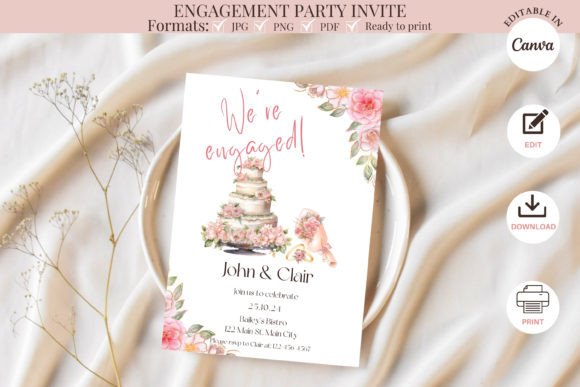
This particular engagement party invitation template strikes a beautiful balance between modern sophistication and warm celebration. The layout is clean and uncluttered, giving each piece of information room to breathe while maintaining visual interest through thoughtful typography choices and subtle design accents. The overall aesthetic leans contemporary with classic undertones, making it versatile enough to suit a wide range of engagement party styles and themes.
What Makes This Invitation Template Stand Out
The visual character of this template is rooted in its thoughtful composition. The design uses a harmonious blend of serif font and script font elements to create a layered typographic hierarchy that guides the eye naturally from the couple's names down to the event details. The headline text carries an elegant, slightly romantic quality—perfect for capturing the celebratory spirit of an engagement announcement—while the supporting details remain crisp and highly readable.
What I appreciate most about this design is its restraint. Too many invitation templates try to do too much, layering ornamentation on top of ornamentation until the actual information gets buried. This engagement party invitation template takes a different approach. It uses negative space as a design element, allowing the typography and layout to do the heavy lifting. The result is an invitation that feels polished and intentional without being overwrought.
The color palette is adaptable, and because you're working in Canva, swapping hues to match your party's theme takes just a few clicks. Whether you're drawn to soft blush tones, deep jewel hues, or clean monochromatic schemes, the template's structure accommodates these shifts gracefully. This flexibility makes it a genuinely useful design asset rather than a one-note template that only works under specific conditions.
Practical Details: What You Get and How It Works
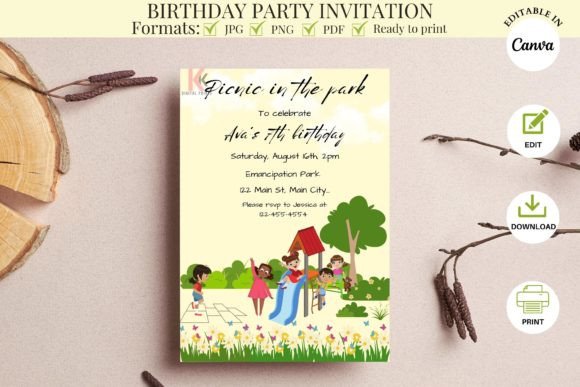
This is a digital product, and understanding what's included helps you make the most of it. The package includes a PDF file containing direct links to the Canva templates along with a YouTube tutorial video that walks you through the editing process step by step. Two template sizes are included: a standard 5" x 7" printable template and a 2-up layout on an 8.5" x 11" sheet, which is particularly practical if you're printing at home and want to minimize paper waste.
You'll need a free Canva account to access and edit the templates. Canva works well on desktop, laptop, and mobile devices, though I'd recommend using a computer for the initial edits—particularly if you're adjusting text positioning or adding custom elements. The larger screen real estate makes fine-tuning significantly easier.
Here's what you can customize within the template:
- Font editing — Change font style, size, and color to match your vision
- Text box manipulation — Reposition, resize, or add new text boxes as needed
- Image integration — Drag and drop your own photos, logos, or decorative elements
- Unlimited revisions — Make as many edits as you want with no time restrictions
Once you've finalized your design, you have several download options depending on how you plan to produce the invitations. The PDF format works well for both professional and at-home printing. JPG files are ideal if you're sending the design to a print shop, while PNG files are perfect for digital sharing via email or social media. You can also include optional crop marks if you're working with a professional printer who requires them for precise trimming.
Design Tips for Making This Template Your Own
From a practical design perspective, there are a few things worth considering as you customize this engagement party invitation template. First, resist the urge to change everything. The template was designed with a specific visual rhythm in mind, and that rhythm is what makes it effective. Start by updating the text content—the names, date, time, location, and RSVP information—before making any structural changes to the layout.
If you do want to adjust the font pairing, look for combinations that maintain the same contrast dynamic the original design establishes. A display font or script font for the names paired with a clean sans serif font for the details tends to work beautifully for invitations. Avoid using two fonts that are too similar in weight or style, as this can flatten the visual hierarchy and make the invitation harder to scan quickly.
Color choices matter more than people realize with invitations. Consider the lighting and environment where the party will take place. Warm, muted tones suggest an intimate evening gathering, while brighter, more saturated colors signal a lively daytime celebration. If you're incorporating this invitation into a broader brand identity for the wedding events—save-the-dates, the actual wedding invitations, thank-you cards—think about establishing a consistent color story now that you can carry forward.
For those using this template in a commercial context—event planners, stationery designers, or small business owners offering invitation design services—the Canva-based workflow makes client collaboration straightforward. You can share editable links with clients, let them make their own text changes, and then handle the final refinements and export yourself. It's an efficient process that keeps projects moving without endless email chains about font preferences.
Printing and Sharing Your Finished Invitations
Once your design is complete and downloaded, the production path depends on your budget, timeline, and quality expectations. Home printing on quality cardstock—something in the 80-110 lb range—produces perfectly acceptable results for casual gatherings. For more formal events, professional printing on premium paper stock elevates the tactile experience in a way that digital design alone cannot achieve.
If you're sharing invitations digitally, the PNG export at high resolution ensures your invitation design looks sharp on screens of all sizes. Pair it with a short, thoughtful message in your email or text, and you've got an elegant digital invitation that respects both your guests' time and your own budget.
The beauty of a template like this is that it removes the friction from the design process without removing your creative input. You're not starting from a blank canvas, but you're also not locked into someone else's rigid design. It's a starting point that respects your ability to make it yours—and that's exactly what a good template should do.