Minimal - Resume: The Template That Gets You Hired
Let’s be honest. The modern job market is brutal. You might be a talented designer, a savvy marketer, or a dedicated entrepreneur, but if your resume looks like everyone else’s, you’re invisible. Recruiters and hiring managers don’t read every word on the first pass; they scan. They look for a signal of professionalism, organization, and modern sensibility. This is where the Minimal - Resume template comes in. It isn’t just a collection of text boxes and lines; it is a strategic design asset built to bridge the gap between your experience and a potential employer's first impression.
The Psychology of a Clean Layout
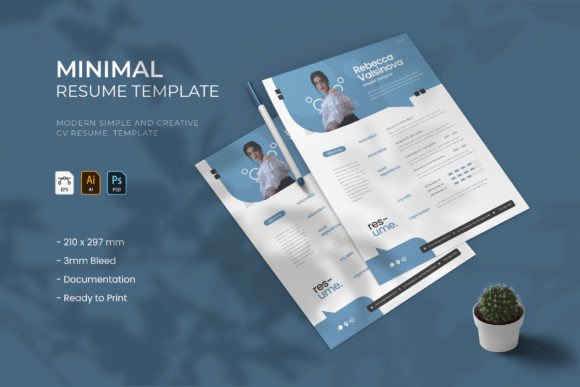
Why does "minimal" work so well in modern typography? It’s about cognitive load. When a recruiter opens a cluttered document, their brain has to work harder to extract information. The Minimal - Resume template leverages a clean and stylish layout to guide the eye naturally. By utilizing ample white space and a clear visual hierarchy, this template ensures that your most valuable assets—your name, your skills, and your experience—are the focal points.
Visually, this template is a masterclass in balance. It avoids the trap of being too boring or too flashy. The design feels contemporary without being trendy to the point of aging poorly in six months. It is a creative font and layout system that respects the intelligence of the viewer. Whether you are a graphic designer looking to showcase aesthetics or a small business owner proving operational competence, the visual personality of Minimal - Resume speaks a language of confidence and clarity. It suggests that you value precision and organization—traits every employer seeks.
Real-World Application: Beyond the PDF
While the primary function of this file is to secure a job interview, the utility of the Minimal - Resume extends further. Think of it as a foundational design asset for your personal brand identity. The structured layout is perfect for more than just employment history.
For freelancers and consultants, you can repurpose the layout to create a "Rate Card" or a "Services Overview" brochure. Because the file comes with a built-in image placeholder, it is incredibly effective for creative professionals who need to show, not just tell. A photographer or a content creator can swap the standard headshot area for a portfolio hero image, turning a standard CV into a visual pitch deck.
Furthermore, the versatility of the file formats—AI, EPS, and PSD—means you aren't locked into a single workflow. If you are an Adobe Illustrator user, you have total vector control. If you prefer Photoshop, the layered template allows for rapid image manipulation. This cross-compatibility ensures that the template fits into your existing creative process, rather than forcing you to learn new software. It is designed for the busy professional who needs high-quality results without a steep learning curve.
Mastering Visual Hierarchy and Readability
A great resume does more than list dates and job titles; it manages information flow. The Minimal - Resume template excels at readability. The layout is crafted to create a distinct separation between different types of content. Your contact information sits at the top, distinct from your education and skills sections. This isn't accidental; it is strategic typography.
When you edit this file, you will notice the use of paragraph styles. This is a crucial feature for maintaining consistency. It ensures that every heading has the same weight and every bullet point aligns perfectly. In the world of editorial design and branding, consistency is the hallmark of professionalism. If your font sizes jump around or your margins are inconsistent, it signals a lack of attention to detail. This template prevents those errors by giving you a structured framework.
The inclusion of free fonts is another practical advantage. You don't need to worry about licensing fees or missing font files when you send your resume to a printer or an ATS (Applicant Tracking System). The typography is chosen to be legible across both digital screens and printed paper, ensuring your message remains clear regardless of the medium.
Practical Guidance for Customization
Getting the most out of the Minimal - Resume requires more than just typing in your details. Here is how to maximize the impact of this template:
- Color Psychology: The template comes with three different color schemes. Do not choose randomly. If you are applying to a corporate law firm, stick to the most conservative, high-contrast scheme. If you are applying to a startup or a marketing agency, you can afford to use a bolder accent color to show personality. The color should enhance the content, not distract from it.
- The Image Placeholder: Use a professional headshot. The image placeholder is sized for high-resolution output. Avoid selfies or cropped group photos. A clean, well-lit headshot against a neutral background builds immediate trust.
- File Selection: Choose your file based on your editing style. If you want to change the underlying grid or vector shapes, use the Adobe Illustrator (AI/EPS) version. If your main concern is photo editing and texture overlays, the Photoshop (PSD) version is your best bet.
- Layered Editing: Take advantage of the layered template structure. You can toggle layers on and off to experiment with layout variations before committing to a final print.
Ultimately, the Minimal - Resume is more than just a file you download; it is a tool for professional positioning. It allows bloggers, crafters, and digital nomads to present their work with the same level of polish as a Fortune 500 executive. By combining a clean layout with robust file compatibility, it removes the friction from the job application process, letting your skills do the talking.